
Project 00000 demo
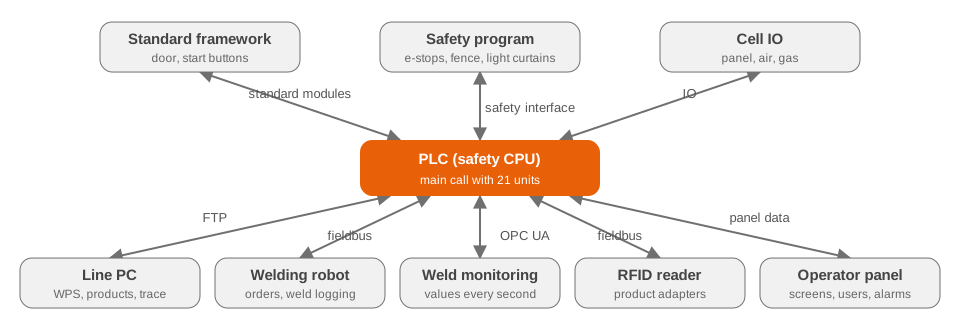
A robot cell that welds large steel girders with a wobbling laser beam and cold wire: a safety PLC, a welding robot, weld monitoring, RFID identification of the product and a line PC that stores the welding parameters (WPS) and the trace data of every product.
The PLC program, the operator screens, the web dashboard, the test runner, the documents and the 3D model were developed by the machine builder together with Claude Code (Anthropic's AI coding assistant).
Demonstration. Everything on this site runs in your browser. A JavaScript simulator plays the PLC and the line PC: no machine, no PLC and no real data are connected. Commands you give here move only the simulated cell.
The line PC dashboard as it is used on the machine: main screen, operation, editors, live welding, products, OEE, counters, trend, WPS, master data, diagnostics and the 3D views.
Open the dashboard › 2The commissioning page for the real machine: preparation, safety, IO check, function tests and sign-off. Here it is fed by the simulator.
Open commissioning › 3The automatic test scenarios that tested the PLC program in simulation before the machine existed. Run them and watch the dashboard react.
Open the test runner › 4The cell in 3D: an operator loads the product, the door closes, the robot welds, the product is unloaded. Drag to rotate, pinch or scroll to zoom.
Open the 3D demo › 5How the project came about with Claude: from the functional specification to tested PLC code, screens, documents and the 3D demo.
Start the presentation ›Open the dashboard and use the tab Operation to start the cell, choose the test product and press start: the simulator loads, welds and unloads, and the live, products, OEE and counters pages fill up. Or let the test runner do it: select a few scenarios and press Run selected. The simulated cell keeps running while you switch between the pages of this site. Reloading the page starts the simulation again from the beginning.